Every product designer knows the exact texture of the hours that precede a major client presentation. It is not spent on high-level strategy or aesthetic breakthrough. It is consumed by the mindless, high-volume execution of systematic changes. You are renaming layers, re-binding variables, and pushing microscopic structural alterations across dozens of screens. It is work that requires absolute precision but zero creative taste. This repetitive labor is the hidden tax of running a modern digital product practice.
When we founded our studio, we resolved to treat this structural overhead as an engineering problem rather than a human scheduling problem. The solution did not emerge from a performance crisis or an unusable canvas. It came from a deliberate pursuit of bulk-execution leverage. We recognized that an intelligent agent could execute high-volume system maintenance at a speed and accuracy that a human designer could never match by hand.
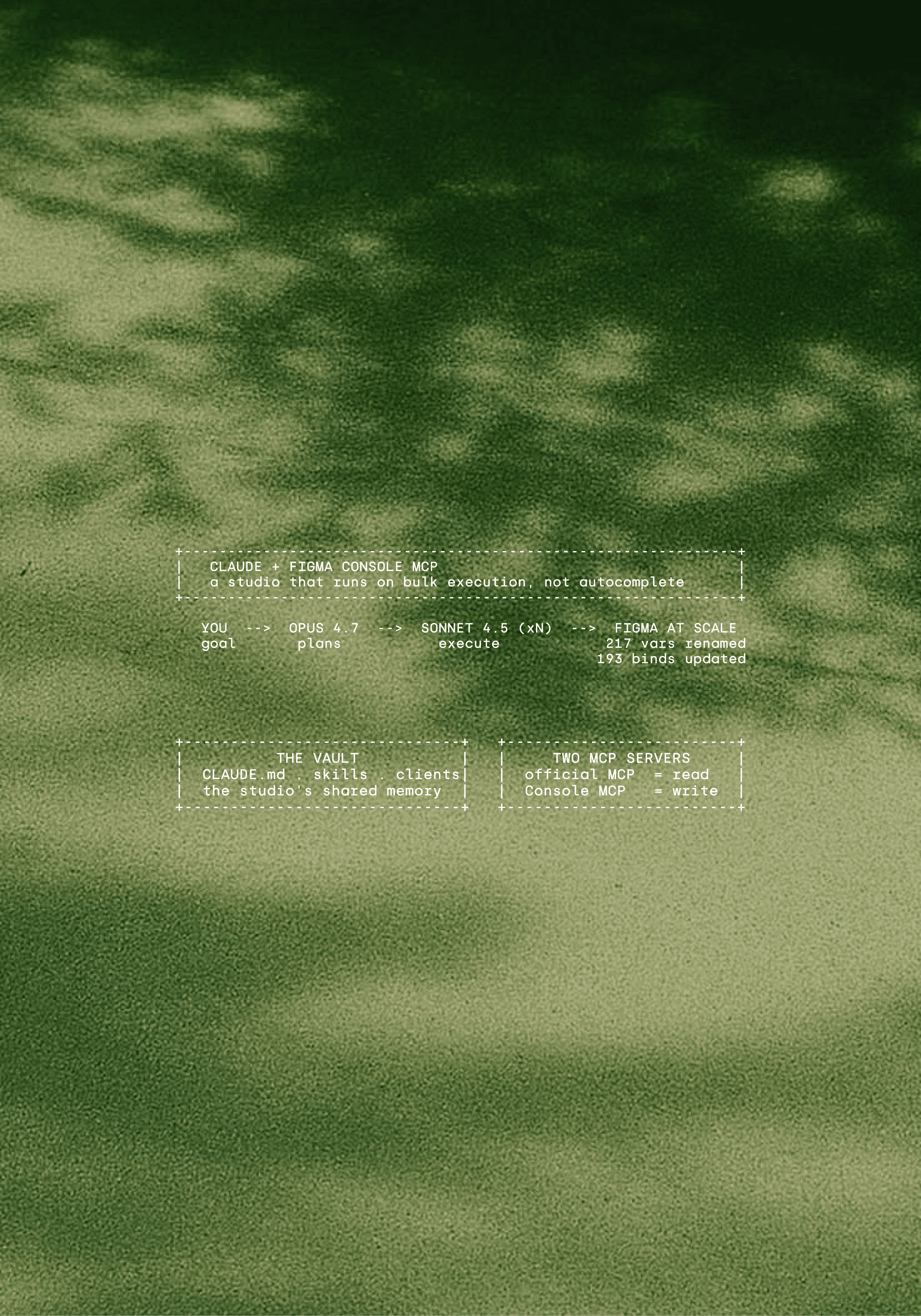
The turning point arrived during a comprehensive overhaul of the GAGA design system, which is the foundational token library for our client, Krow. We needed to rename every single variable in the library from kebab-case to camelCase. The operation spanned 217 variables distributed across three distinct collections, which included 6 primitive tokens, 22 semantic tokens, and 189 component tokens.
Executing this transformation manually would have required days of careful, error-prone clicking inside the Figma variable panel. One missed field would break downstream implementations. Instead, Claude Code executed the entire migration in a single afternoon through a series of batched runs. Every single binding survived the transition perfectly because Figma variables are bound internally by unique identifiers rather than by their surface names.
Separately, we tackled a structural consolidation task within the same library. We targeted 8 redundant gap variables that had accumulated over months of rapid feature development, aiming to compress them into a single, highly disciplined semantic token. When the token-sync run was executed, the change cascaded seamlessly to 193 updated component bindings across the entire file.
In a third instance, we needed to generate comprehensive token-chip documentation for a component overview page. The agent populated 27 structural chips programmatically, pulling live token data and formatting the visual representations in roughly 18 seconds. These are the explicit proof points that shifted our perspective. A professional designer should never spend a Tuesday afternoon manually updating hundreds of individual token dropdowns.
The bet: we stopped using Claude as autocomplete
We stopped treating language models as an autocomplete interface. That single conceptual shift transformed our operation.
Most design teams approach artificial intelligence as a faster pen. You draft a prompt, the model returns a block of text or an isolated layout, and you paste it into your canvas. This pattern is moderately useful for generating placeholder copy or breaking through initial creative blocks. It is completely useless for maintaining a complex design system or running a scaling client services practice.
The traditional chat interface suffers from terminal amnesia. The model retains no structural memory between separate conversational sessions. It possesses no native awareness of what was shipped yesterday, what naming conventions were agreed upon last month, or how a specific client prefers to structure their component properties. Every new chat window forces you to start from absolute zero, rebuilding context through manual copying and pasting.
Our bet was entirely different. We chose to treat the model as a highly capable junior engineer with an absolute memory layer, and we elected to construct that memory layer directly on our local infrastructure. We moved the context out of the ephemeral model web interface and onto our local disks.
By externalizing our structural knowledge into plain markdown files inside a version-controlled folder, we created a permanent, addressable source of truth. The agent reads this directory, updates it based on real-time project developments, and writes back to it using the exact same protocols that we use as operators. It is a shared cognitive workspace where human intent and machine execution operate on the same files. Over a period of several weeks, this evolved into a comprehensive, highly systematic ai design workflow that underwrites our entire operational model.
The vault: everything our studio knows, in plain markdown
Everything our studio knows about our projects, clients, and internal systems lives inside a single local folder. This directory is not an opaque database or a proprietary software ecosystem. It is an Obsidian markdown vault. The structure is transparent, lightweight, and easily indexed by standard terminal utilities.
The architecture of the directory follows a strict layout:
At the root of this directory sits a file named CLAUDE.md. This document acts as the standing brief for our entire operational practice. When Claude Code initializes within this vault, it parses this file immediately, inheriting every systemic rule we have established for the studio. It absorbs our voice constraints, our explicit folder architectures, our internal component naming conventions, and our uncompromising punctuation rules, such as our total prohibition of em dashes in any public copy. Every sub-agent spawned by the primary system inherits these instructions automatically.
The clients/ directory contains isolated folders for every active engagement, housing specific brand guidelines, component requirements, and real-time meeting summaries. The behoove/pm/ path maintains internal project management states, scheduling constraints, and delivery timelines. The claude/skills/ folder contains roughly 50 reusable runbooks that we designate as Superpowers. These runbooks are paired with claude-mem, a persistent cross-session memory layer that actively monitors the vault, surfacing historical context and design requirements without requiring human intervention to construct a prompt. Interrogating this directory with Claude Code is the backbone of our Claude Code design workflow.
We established the discipline of vault curation on day one. We knew that dumping raw, unedited client email threads or unstructured Slack exports into the directory would degrade performance. Inaccurate or outdated feedback from six months ago would contradict recent decisions, causing sub-agents to execute tasks against stale specifications.
To prevent this context drift, the vault is maintained with the same meticulous rigor as a production software repository. If a design requirement, a client feedback item, or a structural token change is not actively recorded in the vault, it does not exist to our systems. This absolute clean-room approach allows us to execute complex design-system work with a degree of structural certainty that traditional chat models cannot replicate.
Where the official Figma MCP runs out: it reads, it does not write
Integrating an intelligent terminal agent with a visual canvas requires a standardized communication protocol. We began this journey by adopting the official Figma MCP server the day it was released to the public, adding it directly via our command-line interface:
The official server is exceptional at performing baseline observational tasks. It bridges the gap between the terminal and the canvas by exposing design file data through Figma's standard REST API. Through this channel, the model can quickly read frame boundaries, inspect structural layer hierarchies, fetch token values, and parse component property names. For interrogating a Figma MCP design system this is plenty; for maintaining one it is not.
We rapidly encountered an insurmountable wall when attempting to use the tool for active engineering tasks. The official server is architected as a read-mostly bridge. It excels at analysis but lacks the write permissions required to alter a design file at scale.
When we needed to execute the consolidation of those 8 redundant gap variables within the GAGA design system, the official server could not modify the data. When we needed to execute the 217-variable rename across the Krow environment, the REST-based tool could not write those changes back to the live file. Read capabilities can tell you exactly where a system is broken, but we required a system capable of modifying the canvas programmatically without human intervention. This limitation is a common friction point in standard design-to-development handoffs, where static observation fails to meet the needs of active system maintenance.
Figma Console MCP: write access to the canvas at scale
To bypass the write limitations of the REST API, we integrated a secondary server into our execution stack. Built by the development team at Southleft, Figma Console MCP takes a fundamentally different architectural path. Instead of routing commands through external web endpoints, it communicates directly with the internal Figma Plugins API.
To operate this system, we run a companion bridge plugin inside the native Figma desktop application. When Claude Code dispatches a tool call from the terminal, the message hits a local server, routes through the desktop bridge, and executes directly inside the active canvas environment. This architecture gives the model complete, uninhibited access to any method exposed by the robust Plugins API ecosystem.
The operational capabilities of this plugin-based approach are significant. Southleft's documentation notes that the tool can process up to 100 variable changes per call, running roughly 10x faster than one-at-a-time REST operations. It allows the agent to edit component properties across hundreds of distinct instances simultaneously, extract entire design system kits in a single operation, and access low-level console logs when an automation sequence encounters an unexpected error state.
In our daily production environment, we run two distinct instances of Figma Console MCP side-by-side in our terminal. One instance is locked to the active Krow workspace, while the second is tied to the Menel architecture. This setup allows a single operator to manage automated design actions across separate client systems from a single terminal window.
True operational honesty requires acknowledging that these high-capacity tools come with complex real-world trade-offs. While the theoretical throughput is high, we frequently hit rigid execution timeouts within the plugin environment, causing calls to hang if they run between a few seconds up to about 30 seconds. To manage this constraint, our automation sequences must chunk massive batch operations into smaller, isolated steps.
Furthermore, font loading must be executed globally outside of processing loops to prevent the canvas from throwing catastrophic text layout errors. Understanding these gritty infrastructure realities is what separates a working production system from a theoretical demonstration. The official Figma MCP and Figma Console MCP are not competing alternatives, they form a unified technical stack. We use the official tool to gather system data, and we deploy Southleft's server to execute the changes.
Parafoldering: making a Figma file legible to an agent
The introduction of programmatic write access revealed an immediate problem. While our technical stack was capable of executing bulk changes, our design files were completely unprepared for the precision required by an automated agent.
The first time we allowed Claude to interact with the Krow file without constraints, it burned through tens of thousands of API tokens simply attempting to parse the chaotic spatial arrangement of the workspace. The file was filled with orphaned presentation frames drifting in the canvas coordinates, unparented text layers floating outside of formal structures, and component sheets that resembled a digital junk drawer. The model became disoriented, timing out as it attempted to trace non-linear layer lineages.
To solve this, we instituted an absolute rule for file organization across our entire practice: every single node must reside inside a defined Section, every Section must live within an explicitly named page, and no element is permitted to float freely on the open canvas.
We call this structural taxonomy parafoldering. The name borrows directly from PARA, Tiago Forte's method for organizing digital information into Projects, Areas, Resources, and Archives, which is the same system we use to structure the markdown vault. We took that instinct for clean, addressable hierarchy and pointed it at the Figma canvas instead of a notes folder. The name is deliberately unsexy because it represents a strict administrative discipline rather than a superficial feature. Implementing this pattern immediately solved a massive data processing crisis.
Before we adopted parafoldering, a single comprehensive metadata call on the unorganized Krow file returned a payload of roughly 380,000 characters. This massive wall of text was far too large and unstructured for an agent to process inline, leading to dropped context and hallucinated paths.
The moment the canvas was reorganized into clear pages and named Sections, those assets transformed into discrete, addressable nouns. Instead of instructing the model to scan an entire multi-page file for a specific component, we can now configure a precise tool call that targets a single named Section. The data footprint dropped precipitously, model accuracy rose, and the agent stopped losing its place in the layer tree. This file structure has absolutely no impact on Figma's internal rendering engine or surface frame rates, its sole purpose is to make the design environment completely legible to an automated system.
Parallel runs: one agent plans, several agents execute
Once our markdown vault and our canvas files were aligned under this spatial discipline, we evolved our operational model. We shifted away from real-time, interactive human-machine prompting, replacing it with an asynchronous, attended parallel execution framework.
Our operational division of labor is distinct: Opus 4.7 plans the structural initiatives, and Sonnet 4.5 handles the heavy execution runs. Sonnet 4.5 acts as our primary daily driver, carrying out the vast majority of our active terminal operations.
When executing a complex system update, we present the global goal to Opus 4.7. This might involve auditing structural responsiveness across an entire layout system, or verifying complex color token values against updated contrast standards. Opus 4.7 reviews the central CLAUDE.md brief, references our specialized Superpowers runbooks, and drafts a step-by-step execution plan. Once that plan passes initial human inspection, the model spawns isolated Sonnet 4.5 sub-agents and dispatches them across our active Console MCP instances simultaneously.
This is the part that still feels strange. We are not telling the agent what to do step by step. We hand one agent the goal, and it tells the other agents what to do. You have your AI direct your AI.
This parallel processing capability allows us to manage separate workspaces at the same time. While one sub-agent checks layout compliance inside the Krow environment, a separate agent works through the Menel asset tree. They operate out of the same shared local vault, using the file system to prevent cross-contamination.
In one production session, we deployed this setup to audit 16 complex Menel frames for responsive break points, while running 6 distinct fix agents in parallel across the canvas layers to repair alignment errors. Over a single weekend sprint, this methodology allowed us to construct 9 comprehensive Menel pages, completely optimized for tablet and mobile viewports.
We do not run these systems on complete autopilot while we sleep. These are closely attended execution windows that frequently occur during late-night sessions between 11pm and 3am. The operator remains at the terminal, monitoring the execution streams and evaluating every modification through local git diffs inside the markdown vault before committing changes to the production system.
What this actually buys us: leverage instead of headcount
The operational leverage generated by this methodology has fundamentally transformed the commercial capacity of our practice. By eliminating the manual maintenance overhead that traditionally caps the growth of a boutique team, we have unlocked significant business scale. We can confidently evaluate what we have shipped across multiple complex products without expanding our administrative headcount.
The pattern repeats across every kind of work.
Operation | By hand | With Claude Code and Console MCP |
|---|---|---|
217-variable case migration | Days of careful, error-prone clicking | A single afternoon of batched runs |
193 component re-bindings | Hours tracking down nested instances | One token-sync operation |
Token-chip documentation | Tedious copying and typing | 27 chips populated in 18 seconds |
Multi-device responsive layouts | Repetitive manual frame duplication | 9 Menel pages across a weekend |
This structural efficiency is the primary driver behind our ongoing evolution into a highly leveraged, ai-native design studio. We have not discovered a shortcut for creative insight or brand strategy. Instead, we have successfully outsourced the repetitive, memory-intensive maintenance work to a terminal-driven framework. This leverage allows us to service three demanding client retainers simultaneously without sacrificing execution quality or missing delivery milestones.
Where it breaks, and where a human has to stay in the loop
An honest field report requires absolute transparency regarding failure modes. If you treat this technical stack as an unmonitored autopilot system, it will systematically corrupt your design files in a matter of seconds.
As a starting point, language models possess absolutely no innate visual taste. An agent can read layout numbers, evaluate explicit spatial geometry, and verify that a contrast ratio perfectly meets accessibility standards. It cannot tell you if an enterprise interface feels premium, or if a typography scale matches a client's brand strategy. The model will happily construct a layout that satisfies every mathematical layout constraint in your system while producing an arrangement that is visually unacceptable. Every single commit requires a human designer to exercise aesthetic judgment.
Furthermore, nested auto-layout structures are incredibly fragile under automated conditions. If a component utilizes three or more overlapping layers of fill, hug, and fixed spatial constraints, a major batch variable change can cause the layout engine to scramble the visual tree. We have learned to isolate these complex component cores, updating them by hand and inspecting them visually rather than targeting them with automated scripts.
Cultural context presents another clear boundary. While the model can translate string literals into different languages with ease, it completely misses the nuanced linguistic register required for our local Turkish market operations. It cannot capture the precise corporate tone that our local enterprise clients expect. As we noted in an earlier piece on AI in UX, treating artificial intelligence as a substitute for human cultural understanding is a critical operational error.
Finally, you must accept that running batch operations via the Plugins API means working with loaded weapons. A single malformed token-naming loop can flatten a massive component chip tree in five seconds. During our development phases, we have accidentally left production fonts completely unbound, and we have leaked incorrect tier colors into client-facing deliverables.
We also uncovered a bizarre quirk embedded within the Figma Plugins API itself. The interface silently converts text letterSpacing values from PERCENT to PIXELS the exact instant a variable is bound to a text style. If a style calls for a 4% tracking value at a 16px font size, the agent must pre-compute that value as -0.64px before initiating the call, or the layout type breaks instantly. To safeguard against these system bugs, we now mandate a strict protocol: we take a visual canvas screenshot before every single commit and execute a complete pre-completion system audit before any work is signed off.
How to start without doing the grunt work yourself
You do not need our full multi-instance setup to start. And it is worth being precise about how this actually works, because the point is easy to miss: you are not the one doing the clicking. You point an agent at the problem and it does the work. The skill you build is direction, not execution.
First, parafold your messiest file. You do not drag the frames around yourself. You hand Claude the rule once, every node lives inside a named Section, every Section under a named page, nothing floats on the canvas, and let the agent reorganize the file. Once it is addressable, everything else gets easier.
Second, start a local markdown vault and let Claude Code read and write it. Put a CLAUDE.md at the root with your studio rules and keep one clean subfolder per client. You are not the only one maintaining it; the agent updates it as the work happens. Your real job is curation, deciding what earns a place and what is noise.
Third, install both MCP servers. The official Figma MCP for reads, Figma Console MCP for writes. This is the one part you do by hand, and it takes about fifteen minutes with the plugin panel open. After that, the agent works the canvas, not you.
The further you take this, the less you touch directly. Eventually you stop telling the agent how to perform each task and start handing one agent the goal, letting it tell the other agents what to do. That is the real shift, and it sounds stranger than it is: you have your AI direct your AI.
FAQ
Do I need the Figma Plugins API to use Figma Console MCP?
No. The server includes its own built-in Plugins API harness. You simply install Southleft's companion bridge plugin inside your Figma desktop application and leave it active while working. The MCP server automatically handles the low-level routing. You do not need to write any custom plugin code. The official Figma MCP handles your REST-based data reads, while Figma Console MCP processes your plugin-based writes. We deploy both servers simultaneously within our daily terminal stack.
Is Sonnet enough or do I need Opus?
You need to deploy both models to run this workflow effectively. Sonnet 4.5 acts as our primary execution tool, managing active component adjustments, processing token operations, and running the terminal sub-agents. Opus 4.7 operates at a higher level of abstraction, evaluating project requirements and structuring the global execution plans. Sonnet 4.5 performs the heavy structural lifting, while Opus 4.7 directs the system.
Can a solo designer use this?
Yes. The local markdown vault framework scales effortlessly down to a single operator. The administrative discipline of parafoldering delivers immediate structural benefits on any design file that contains more than roughly 150 components. The technical installation of the dual-MCP server stack requires less than fifteen minutes of initial setup. The primary difficulty is not the complexity of the software, it is maintaining the daily organizational discipline required to keep both your markdown vault and your design canvas perfectly clean.
What does Figma Console MCP do that the official one does not?
It provides full write access to the canvas at scale. The tool enables batch variable adjustments up to 100 changes per call, running roughly 10x faster than traditional REST operations. It allows you to edit component properties across hundreds of instances simultaneously, extract entire design system kits in a single command, and monitor active console logs during execution. The primary trade-off is that it requires a third-party plugin installation and must be run inside the desktop application interface.
Where does the workflow break?
The workflow breaks down completely on tasks that require genuine visual taste, brand alignment, or local cultural register. It faces significant technical friction when encountering complex auto-layout architectures that feature three or more nested structural constraints fighting for spatial dominance. It will fail on any creative challenge where the correct answer relies on human design judgment rather than predictable systematic execution. Because of these limitations, an experienced designer must actively monitor the terminal during every major execution window.
What is next: a design system teardown and the tool we are building
We have two technical follow-up reports currently moving through our content pipeline. The first piece will provide a detailed look at the internal architecture of the GAGA design system itself, outlining how we structure our multi-tier token trees and maintain them across separate client environments. The second piece will detail the architecture of an internal, ai-native design studio software utility that we are actively building on top of this exact terminal workflow.
If you are interested in deploying this integrated Claude Figma MCP stack across your own product infrastructure without undertaking the initial development overhead yourself, our studio designs and deploys these automation frameworks for active clients. Detailed inquiries regarding our technical availability and project scheduling can be submitted directly through a discovery call.